

The Preformatted Block shares characteristics with the Paragraph Block and the Code Block, but deserves its own place.
Do you want to display text exactly as typed? Use the Preformatted Block. It handles whitespace perfectly. Which is an important requirement for ASCII art!
Let’s conduct a little experiment. Compare the following three lines:
The words in this line are separated by two spaces.
The words in this line are separated by two spaces.
The words in this line are separated by two spaces.
The first line is an ordinary paragraph, the second line is formatted as inline code, and the third line is created with the Preformatted Block.
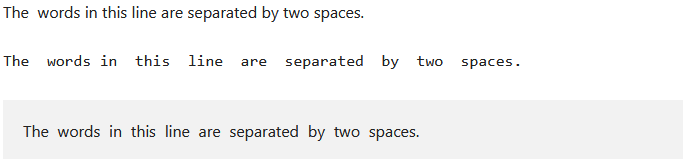
As the image shows, all three lines are typed with extra spaces in the Block Editor. The extra whitespace is ignored when published, except with the Preformatted Block.
How to create a Performatted Block
You can create a Code Block with the Block Inserter Icon  in the upper left corner. When you don’t see the Code Block, search for it.
Another option is the Block Inserter at the right side of a new paragraph. Same procedure here, when you don’t see the Code Block, just search for it.
Another way, is entering /performatted at the beginning a new paragraph.
With the first button of the Block Toolbar, you transform a paragraph into a Performatted Block. Did you change your mind, simply transform it back into a paragraph.
The Block Toolbar of the Performatted Block offers only the core functions for moving, text options, and the more options.
Settings Panel
The most common options of the block are handled through the Block Tool Bar.
Additional features, however, are available in the right sidebar. To get there, click the sidebar icon  , directly left from the Publish/Save-button.
Here you have additional options for text and background colours, and typography.
Advanced Settings
Blocks also offer fields where you can enter an HTML anchor and one or more CSS classes. Read about these features in Advanced Sidebar Settings of a Block.
The HTML of the Preformatted Block
<pre class="wp-block-preformatted">The words in this line are separated by two spaces.</pre>The Preformatted Block encloses the text typed between a <pre> opening and a </pre> closing tag.
Gutenberg adds a wp-block-formatted class, which makes it easier to style.